About

Everything you need to
measure, document, and deliver
professional results.

Measure Tech PRO was built for the people who do the work — contractors, window and door installers, property inspectors, and field crews who need fast, accurate documentation from first site visit to final report. One app. iPhone, iPad, and Mac.

5 Layout types
Grid · Sketch · Document · Elevation · Drafting
19+ AI features
Powered by Gemini 2.5 Flash
130+ Pin types
Across 16 trade categories
3 Platforms
iPhone · iPad · Mac
Our Story

Built in the Field.
Refined on the Job.

Measure Tech PRO started with a simple frustration: field crews were losing time re-entering measurements, hunting for photos, and manually assembling reports. So we built the tool we wished existed.

The org chart is short — one window & door contractor, building between installs, testing every feature on his own jobs before shipping it, and pricing the result against the stack of tools he was actually paying for.

Today it is a full CRM for contractors. It runs a contracting business end to end: the lead, the customer, the job, the measurement, the estimate, the signed contract, the change order, the invoice, the card payment, the crew, the timesheet, and the payroll run. Sixty-six kinds of business record, one system, on iPhone, iPad, Mac, and the web.

It started as a measuring tool because that is where the errors were. It became a CRM because the measurement was never the problem anyone was actually paying to solve — the problem was everything that happened to that number afterwards. A takeoff retyped into a spreadsheet, priced in a second app, signed on paper, invoiced from a third app, and chased by phone. Measure Tech PRO closed that whole gap, and kept the measuring free.

Get Early Access See All Features →
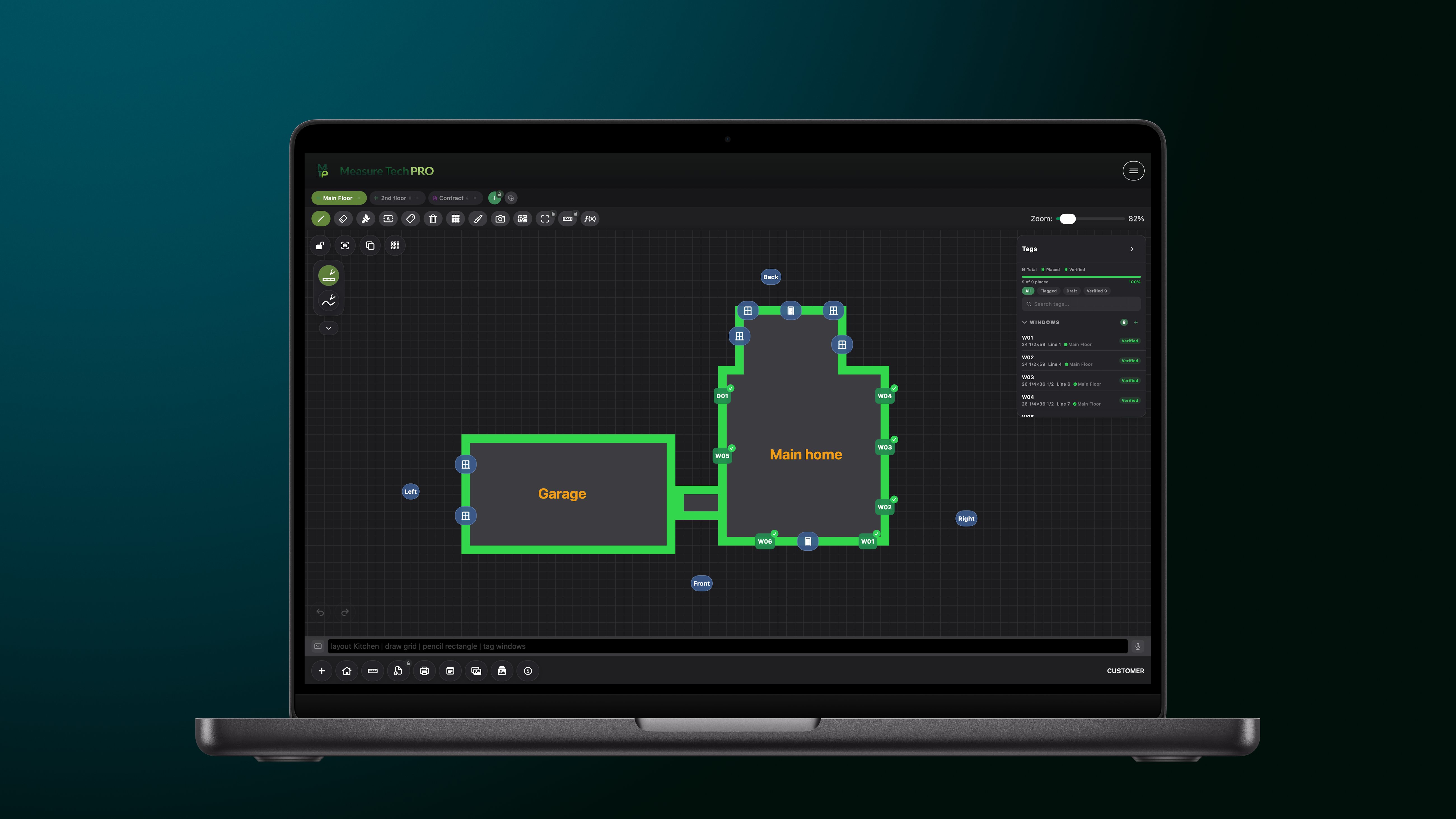
Measure Tech PRO on Mac — Grid floor plan
📐 Measure Tech PRO — Grid Layout
Floor plan grid with W01/D01 tag system · DXF · PDF export
Who It's For

Built for the People Who Do the Work

Measure, sell, and run the business — three trades, one app. See every feature →

Window Installers
Window & Door Installers
AI elevation scanning reads window and door positions from photos. Mull configuration builder handles multi-unit assemblies. Direct ProVia EntryLink export — no re-keying measurements between systems.
Contractors
General Contractors
Run multiple crews across multiple sites with real-time visibility. Markets and role-based access give every person exactly what they need. Review dashboard flags every incomplete tag before the crew leaves.
Inspectors
Property Inspectors
Document layout supports multi-page inspection templates. Voice dictation for hands-free field notes. GPS-tagged photos and branded PDF reports that match professional standards.
Technology

What Powers Measure Tech PRO

Built on the best tools Apple and Google have to offer — no wrappers, no shortcuts.

Firebase AI
Firebase AI — Gemini 2.5 Flash
Powers the AI Assistant, Elevation Scanner, AI tag creation, completeness checks, and all 19+ AI features. Cloud-based. Internet required.
LiDAR
LiDAR + RoomPlan (ARKit)
LiDAR mesh and tracked raycasts power AR Measurement on iPhone 12 Pro+ and iPad Pro (2020+). RoomPlan highlights likely doors and windows automatically.
Firebase
Firebase — Firestore & Storage
Real-time team sync via Firestore. Project photos, documents, and drawings stored in Firebase Storage. Role-based Security Rules enforce per-user permissions.
Speech
SFSpeechRecognizer (On-Device)
Voice input for the command bar uses Apple's on-device speech recognition — fast, private, and works without internet. Compatible with iOS 16+ and iPadOS 16+.
Apple
PencilKit & SwiftUI
Sketch and Document layouts use Apple's PencilKit for native Apple Pencil support. The entire app is built in SwiftUI, targeting iOS 16+, iPadOS 16+, and macOS 13+.
Stripe
Stripe Billing
All subscriptions are billed on our website and processed by Stripe. We never receive or store payment card information. Your plan unlocks automatically on every device where you sign in.
DXF Engine
DXF / DWG / SVG Engine
DXF files import and export on-device. DWG files are cloud-converted. Exports include INSUNITS metadata for AutoCAD compatibility. Layer names, line types, and 6-decimal coordinate precision preserved.
EntryLink
ProVia EntryLink API
Direct integration with ProVia's EntryLink ordering system — createorder, additem, submitorder. Credentials stored securely in the iOS Keychain via com.measuretechpro.entrylink.
Cloud
iCloud Drive
Personal project storage and cross-device sync via iCloud. Supports the app's built-in iCloud container or a custom folder in iCloud Drive, Google Drive, or Dropbox.
Version History

Built Release by Release

Ten releases since launch, every one shipped after it was tested on a real job.

Full Release Notes →
Now shipping v1.6 August 2026

One Product, Two Doors

The office console moved into the browser, and every market got its own business phone line — so the work you start in the field finishes at the desk without anything being re-entered.

Office console in any browser Business phone line per market Shared inbox & texts Voicemail-to-thread Missed-call text-back Carrier registration
v1.5.9June 2026
Payroll, End to End
Field time clock to office approval, W-4/I-9 hiring paperwork through the worker's own onboarding portal, all 50 states.
v1.5.5May 2026
Team Gallery & Document Signatures
Team Gallery for cross-project photo browsing, document signatures with PDF export, 7 construction form templates, and DXF/SVG/DWG import into the CAD editor.
v1.5April 2026
CAD Drafting & Five Layout Types
Full CAD Drafting editor with layers, snap-to-grid, and DXF export. Sketch layout expanded with monoline, fountain pen, watercolor, and lasso. Share Extension for importing PDFs and blueprints from any app.
v1.4.7March 2026
Markets, Collaborators & Real-Time Sync
Markets & Organizations for multi-crew management. Collaborator role for read-only field access. Real-time team editing with live presence indicators and remote cursors.
v1.4.1February 2026
AI Elevation Scanner & Knowledge Base
AI-powered elevation scanning using Firebase Gemini. AI Assistant with 19+ commands. Built-in Knowledge Base with searchable docs, FAQs, tutorials, and the full command reference.
v1.3.2January 2026
Mull Configuration
Full mull configuration builder for multi-unit window assemblies. R.O. to exact size offset with per-window override. Interior/exterior measurement mode and leg height field for specialty windows.
v1.3.1December 2025
Pin Catalog & Fill Textures
122 pin types across 26 job presets. Fill texture catalog with favorites, recents, and category search. Collapsible tag panel with quick-capture pin photos.
v1.2November 2025
Custom Stickers & Tag Groups
Custom sticker library for photo markup with shared team sticker sets. Group tag management — duplicate, ungroup, and join in bulk. Redesigned tag picker with favorites.
v1.0October 2025
Launch
Grid-based floor plan editor, AR measurement, photo gallery with annotation, review dashboard, and PDF report generation for project handoff.
Tips & Tricks

From the App Itself

The load-screen tips you'll see every time you open Measure Tech PRO.

Pinch to zoom out for a birds-eye view of your floor plan. Attach photos to tags — AI Suggest reads them for dimensions. Use the tag panel to track every window and door on site. Voice input lets you dictate notes hands-free on the job. Export your floor plan as a PDF report for clients. Use AR Measure for quick room dimensions on site. Flag tags to mark items that need a second look. Swipe between layouts to compare before and after. Pinch to zoom out for a birds-eye view of your floor plan. Attach photos to tags — AI Suggest reads them for dimensions. Use the tag panel to track every window and door on site. Voice input lets you dictate notes hands-free on the job. Export your floor plan as a PDF report for clients. Use AR Measure for quick room dimensions on site. Flag tags to mark items that need a second look. Swipe between layouts to compare before and after.
Get in Touch

Questions? We'd love to hear from you.

A feature request, a bug report, a partnership, or just feedback — reach out. We read every email.

General & Support
support@measuretechpro.com
Trouble on a job, a question about a feature, or something that should work better.
Legal
legal@measuretechpro.com
Contracts, partnerships, trademark, and anything touching the Terms of Service.
Privacy Requests
privacy@measuretechpro.com
Data access, export, or deletion requests — see the Privacy Policy.

Already have an account? Open the office console in any browser.